Sadly, there is no tooling around generating an OData service proxy in F# (that I know of).
In order to work around it I created a new C# class library project and used C# to generate a service proxy to any OData feed. I decided to use Netflix.com and Nerd Dinner.com as examples. Once I had the proxies
in C# I built an ODataServiceProxies.dll and referenced it in a F# script file.
#r @"C:\Program Files (x86)\Reference Assemblies\Microsoft\Framework\.NETFramework\v4.0\System.ServiceModel.dll"
#r @"C:\Program Files (x86)\Reference Assemblies\Microsoft\Framework\.NETFramework\v4.0\System.Data.Services.dll"
#r @"C:\Program Files (x86)\Reference Assemblies\Microsoft\Framework\.NETFramework\v4.0\System.Data.Services.Client.dll"
#r @"D:\ODev Solutions\ODataServices\ODataServiceProxies\bin\Debug\ODataServiceProxies.dll"
open System
open System
open System.Linq
open System.Reflection
open System.Collections
open System.ServiceModel
open System.ServiceModel.Syndication
open System.Xml
open System.Collections.Generic
open System.Data.Services
open ODataServiceProxies.NerdDinner
open ODataServiceProxies.NetflixCatalog
open System.ServiceModel.Activation
let netflix = new NetflixCatalog(new Uri("http://odata.netflix.com/v1/Catalog/"))
(*Showing some movie titles from netflix feed*)
netflix.Titles.AsQueryable()
|> Seq.iter(fun t -> printfn "%s" t.Name)
(*Showing some nerd dinners from NerdDinner.com feed*)
let nerddinner = new NerdDinnerEntities(new Uri("http://www.nerddinner.com/Services/OData.svc/"))
nerddinner.Dinners.AsQueryable()
|> Seq.iter(fun d -> printfn "%s" d.Description)
Very Cool!! I love F#!
Monday, November 15, 2010

More F# Findings
I spend quite a bit of time reading other F# related content mainly from experts of the field.
It's definitely a great way to learn, but sometimes I get really annoyed when people put out some really great F# code only to visualize it with a sad presentation framework like Windows Forms. People... it's 2010 soon to be 2011! We need to start educating everyone on better presentation. I've decided to side track the MATLAB series and just start posting some random findings of mine through playing around in scripts with WPF and Silverlight. The hope is that someone will see something and get something out of it. If not, then at least I can contribute to more F# with WPF and Silverlight content out in the inner webs.
This first discovery is Silverlight related. I'm working on a side project and came across a need to draw a path. So I turned to the following article and decided to re-think and re-do it in F#.
Special thanks to Tomas Petricek for the Utils module logic to lookup Xaml elements in F#.
( Utils.fs )
module Utils
open System.Windows.Controls
let (?) (this : Control) (prop : string) : 'T =
this.FindName(prop) :?> 'T
( Main.fs )
namespace DrawingAPath
open Utils
open System
open System.Windows
open System.Windows.Controls
open System.Windows.Ink
open System.Windows.Input
open System.Windows.Media
type MainView() as this =
inherit UserControl()
let uri = new System.Uri("/DrawingAPath;component/MainView.xaml", UriKind.Relative)
do Application.LoadComponent(this, uri)
let mutable s = new Stroke()
let inkP: InkPresenter = this?inkP
let pv: ListBox = this?PointsViewer
let AddPoints (pX: float, pY: float, device: StylusDevice) =
s.StylusPoints.Add(device.GetStylusPoints(this?inkP))
let DefineInkStroke (ev: MouseButtonEventArgs) =
inkP.CaptureMouse() |> ignore
s = new Stroke() |> ignore
s.StylusPoints.Add(ev.StylusDevice.GetStylusPoints(inkP))
s.DrawingAttributes.Color = Colors.White |> ignore
inkP.Strokes.Add(s)
let DisplayPointsForPath (ev: MouseButtonEventArgs) =
let points =
s.StylusPoints
|> Seq.map(fun sp -> String.Format("X: {0} Y:{0}",sp.X,sp.Y))
pv.ItemsSource <- points
s <- null
do
inkP.MouseLeftButtonDown.Add(fun ev -> DefineInkStroke ev)
do
inkP.MouseLeftButtonUp.Add(fun ev -> DisplayPointsForPath ev )
do
inkP.MouseMove
|> Event.map(fun me ->
let pos = me.GetPosition(this?LayoutRoot)
pos.X, pos.Y, me.StylusDevice)
|> Event.filter( fun (pX , pY, sd) ->
pX > 0.0 && pX < 300.0 && pY > 0.0 && pY < 195.0)
|> Event.add(AddPoints)
Thursday, September 16, 2010
MATLAB to F# Part 1
So I bought the book and brought it home. I couldn't wait to get started but life came into the picture so I had to help make dinner with the wife and kids and then eat dinner. After getting the kids into bed and watching the first five minutes of the wife's favorite T.V. show with her I finally got a chance to come down stairs and get into this a little bit. So, not having any experience with MATLAB I decided to start from the beginning of the book and work my way forward. Since this is MATLAB we need to familiarize ourselves with a few core data structures that will be used heavily through out MATLAB. Vectors & Matrices. In MATLAB vectors are just a simple list in F# and Matrices are essentially tables of vectors also known as list of list in F#. Let start with a few simple examples from chapter 1 of the book.
#r @"C:\Program Files (x86)\FSharpPowerPack-1.9.9.9\bin\FSharp.PowerPack.dll"
open Microsoft.FSharp.Math
Not to shabby, of course we could accomplish the same thing in .NET using F# and WPF.
So I thought about it and decided I did not want to write my own charting component just for the
blog post series. Especially since I've had the first build (and free release) of Visifire for WPF & Silverlight still laying around on my hard drive. :-)
So with the decision made to leverage visifire I produced the following F# code below :

1.5.1 Creating Row Vectors
There are several ways to create row vector variables. The most direct way is to put the values that you want
in the vector in square brackets, separated by either spaces or commas.
>> v = [1 2 3 4]
v =
1 2 3 4
1.5.2 Creating Column Vectors
One way to create a column vector is by explicitly putting values in square brackets, separated by semicolons:
>> c = [1; 2; 3; 4]
c =
1
2
3
4
1.5.2 Creating Matrix Variables
Creating a matrix variable is really just a generalization of creating row and column vector variables.
The matrix variable mat is created by explicitly typing the values.
>> mat = [4 3 1; 2 5 6]
mat =
4 3 1
2 5 6
These core data structures are built in to F#, well the F# Powerpack.
So you can find the F# powerpack at codeplex. Once you download it you can easily open up a script file
and start creating your own vectors and matrices.
#r @"C:\Program Files (x86)\FSharpPowerPack-1.9.9.9\bin\FSharp.PowerPack.dll"
open Microsoft.FSharp.Math
Creating Row Vectors (in F#)
let rowvector = [1.0; 2.0; 3.0; 4.0]
Creating Column Vectors (in F#)
let onecolumnvector = Matrix.ofList [[1.0];[2.0];[3.0];[4.0]]
Creating a Matrix (in F#)
let matrix = Matrix.ofList [[4.0;3.0;1.0]; [2.0;5.0;6.0]]
let rowvector = [1.0; 2.0; 3.0; 4.0]
Creating Column Vectors (in F#)
let onecolumnvector = Matrix.ofList [[1.0];[2.0];[3.0];[4.0]]
Creating a Matrix (in F#)
let matrix = Matrix.ofList [[4.0;3.0;1.0]; [2.0;5.0;6.0]]
With the simple stuff out of the way I wanted to go a little deeper... so on to chapter 2 (Graphical Displays).
Now that we know how to create the data let's do something interesting with it... e.g. visualize it!
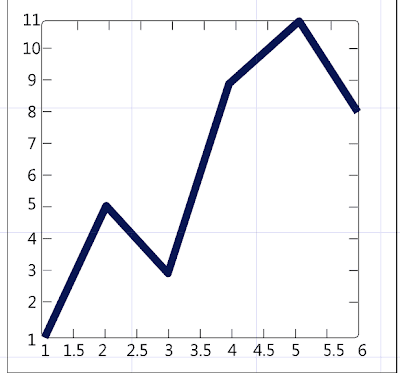
One way to visualize the data is to display it on a standard 2D chart with X and Y coordinates. In MATLAB you'd typically use the "built in" Plot function which (by definition thus far) can plot a single x,y coordinate or optionally two vectors of coordinates representing x and y. So in MATLAB will create a couple of vectors representing x and y. To do this we lay down the following expression :
>> x = 1:6;
>> y = [1 5 3 9 11 8]
The x vector above may look a little strange but basically what were doing is creating a vector from 1 to 6 with a step of 1. So the x and y column vectors above would look like this in the MATLAB command window.
x , y
(1 , 1)
(2, 5)
(3, 3)
(4, 9)
(5, 11)
(6, 8)
Finally, we'd plot the vectors with the following expression :
>> plot (x , y)
It's worth noting that under the covers MATLAB is actually creating a 2D chart, plotting all the points or coordinates in both vectors, and then displays the 2D chart in a new window.
Here is the following MATLAB output.
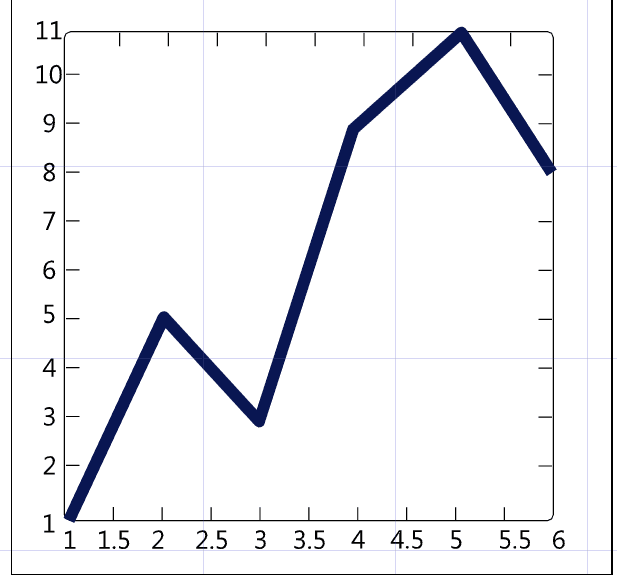
Now that we know how to create the data let's do something interesting with it... e.g. visualize it!
One way to visualize the data is to display it on a standard 2D chart with X and Y coordinates. In MATLAB you'd typically use the "built in" Plot function which (by definition thus far) can plot a single x,y coordinate or optionally two vectors of coordinates representing x and y. So in MATLAB will create a couple of vectors representing x and y. To do this we lay down the following expression :
>> x = 1:6;
>> y = [1 5 3 9 11 8]
The x vector above may look a little strange but basically what were doing is creating a vector from 1 to 6 with a step of 1. So the x and y column vectors above would look like this in the MATLAB command window.
x , y
(1 , 1)
(2, 5)
(3, 3)
(4, 9)
(5, 11)
(6, 8)
Finally, we'd plot the vectors with the following expression :
>> plot (x , y)
It's worth noting that under the covers MATLAB is actually creating a 2D chart, plotting all the points or coordinates in both vectors, and then displays the 2D chart in a new window.
Here is the following MATLAB output.
Not to shabby, of course we could accomplish the same thing in .NET using F# and WPF.
So I thought about it and decided I did not want to write my own charting component just for the
blog post series. Especially since I've had the first build (and free release) of Visifire for WPF & Silverlight still laying around on my hard drive. :-)
So with the decision made to leverage visifire I produced the following F# code below :
#r @"C:\\Users\\cfrederick\\Documents\\Visual Studio 2010\\Projects\\MATLAB Discoveries\\lib\\visifire\\WPFVisifire.Charts.dll"
#r @"C:\\Program Files (x86)\\Reference Assemblies\\Microsoft\\Framework\\v3.0\\PresentationFramework.dll"
#r @"C:\\Program Files (x86)\\Reference Assemblies\\Microsoft\\Framework\\v3.0\\WindowsBase.dll"
#r @"C:\\Program Files (x86)\\Reference Assemblies\\Microsoft\\Framework\\v3.0\\PresentationCore.dll"
open System(*Charting references*) open Visifire.Charts open System.Windows open System.Windows.Controls
//Plot function, used to plot a single data pointlet plot x y = let dp = new DataPoint() dp.XValue <- x dp.YValue <- y dp
let createChart xs ys =
  let chart = new Chart()
  let title = new Title()
  title.Text <- "MATLAB Sample Plotting Chart"
  chart.Titles.Add title
  chart.Watermark <- false

  let data =
   let dataseries = new DataSeries()
   dataseries.RenderAs <- RenderAs.Line
    List.zip xs ys
     |> List.map(fun (x,y) -> plot x y)
     |> List.iter(fun dp -> dataseries.DataPoints.Add dp)
    dataseries
    chart.Series.Add data
   chart
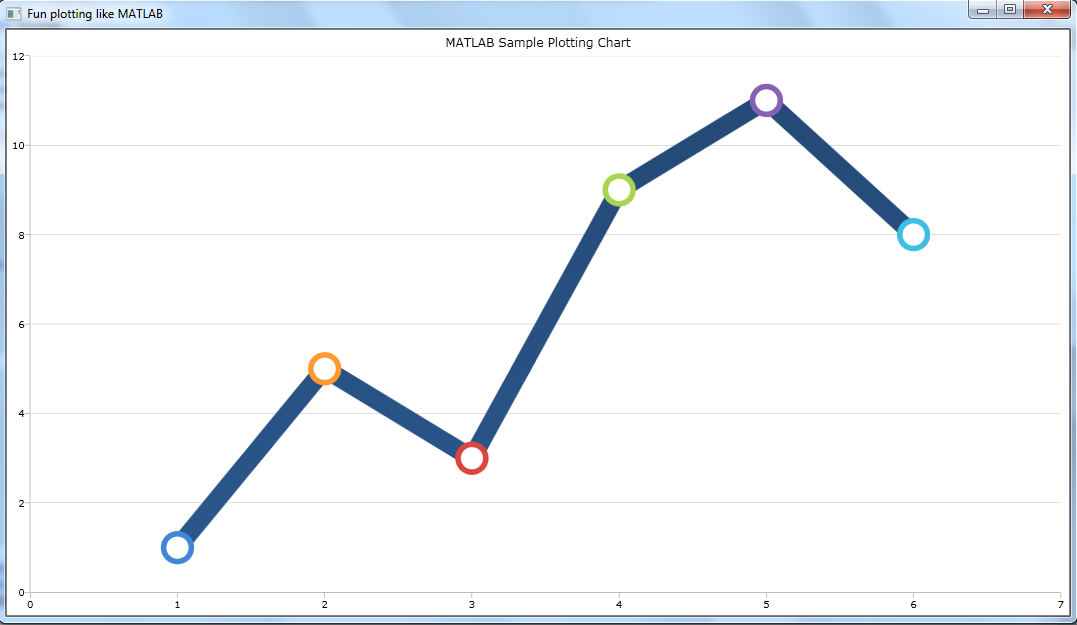
let content = createChart [1.0..6.0] [1.0;5.0;3.0;9.0;11.0;8.0] let window = new Window(Title = "Fun plotting like MATLAB", Content = content)
[] ignore <| (new Application()).Run window
And here is the final output from FSI and VS2010.
Thursday, September 9, 2010
Introducing MATLAB -> ( F# & WPF ) Series

My latest purchase a few days ago was at Borders book store. I went in the store looking for a specific WPF charting book which covers visualizing mathematical formulas. No such luck. However, after turning my attention to the core computer science section, I found the following book on MATLAB (short for" matrix laboratory"). I was never really strong in math and this book seems to be a nice self guided introduction which works up to some advanced data analysis/visualizations. Since I'm constantly looking for core computer science type approaches from a functional perspective I figured this is a good choice. My plan is to obviously teach myself MATLAB but also translate the MATLAB functions over to F# and move the graphical stuff over to WPF. For the last 8 years I've been doing hardcore imperative programming using mainstream languages. More and more every day I wish I where doing functional programming using (F# of course) or something like ML,OCaml, or dare I say Haskell. My long term plan is to teach myself core functional programming so that I can get a job which safely transitions into the functional programming world. My dream job would be to write core functional programs while having the freedom to visualize them using a great presentation framework like WPF. As the title says, I will be going through the chapters & exercises and presenting them here. I will take as much time as I can to produce good quality posts on this topic. You can expect the format to be something like the following: MATLAB source and screen shots( if any), followed by F# source, followed by WPF screen shots. Any way, I'm looking forward to learning MATLAB and sharing my discoveries here on my blog.
-Stay tuned and keep on dev'n
Saturday, July 31, 2010
My F# awareness is improving
So today I read an article that linked to a site called language references. It's basically a site like code keep, it has some snippets of code for common programming tasks or problems. I noticed that there is a section on F# so I decided to check it out. I started scrolling through the list and came to a snippet of code for reversing a string. This coding example is near and dear to me because it's one of those interview questions programmers tend to get... much like fizbuzz. However, after reviewing the implementation which was simple Array.Reverse on a character array I decided to create an account so that I could contribute my version of reversing a string in F#. If you go to the following url: http://langref.org/fsharp/strings/reversing-a-string/reverse-characters you'll see my implementation which is also below.
Here's the problem: http://langref.org/fsharp/xml/parsing/xml-parse
So I came up with the following implementation: (which you will also see on the website)
F# is awesome!!
let word = "reverse me"
//reverse the word
let reversedword =
   word.ToCharArray()
   |> Array.fold(fun acc x -> List.Cons(x,acc)) []
I'm basically using a simple fold with an empty list as the accumulator or the element that's being threaded through. I picked up that tip from a functional programming video I saw on videos.google.com. The topic was Map Reduce. I then went on to the section of the site where they have a list of problems that have not been solved yet. So I decided to tackle one of those. I came across the following and immediately thought it would be rather simple to implement and I could use a simple fold again. :-)
Here's the problem: http://langref.org/fsharp/xml/parsing/xml-parse
So I came up with the following implementation: (which you will also see on the website)
#r @"C:\Program Files (x86)\Reference Assemblies\Microsoft\Framework\v3.5\System.Xml.Linq.dll"

open System
open System.Xml.Linq
//XElement Helper
let xname sname = XName.Get sname

 let xmlsnippet =
    let snippet = new XElement(xname "shopping")
    //create bread
    let bread = new XElement(xname "item")
    bread.SetAttributeValue(xname "name","bread")
    bread.SetAttributeValue(xname "quantity",3)
    bread.SetAttributeValue(xname "price",2.50)
    //add bread to snippet
    snippet.Add(bread)
    //create milk
    let milk = new XElement(xname "item")
    milk.SetAttributeValue(xname "name","milk")
    milk.SetAttributeValue(xname "quantity",2)
    milk.SetAttributeValue(xname "price",3.50)
    //add milk to snippet
    snippet.Add(milk)
    snippet

let totalprice (xe: XElement) =
    xe.Descendants(xname "item")
        |> Seq.map(fun i -> Double.Parse(i.Attribute(xname "price").Value))
        |> Seq.fold(fun acc x -> acc + x) 0.0
F# is awesome!!
Wednesday, May 26, 2010
Another late night learning more about F#
Just thought I'd share a few minor things I'm working on in my spare time. The first little project is a visualization project that I'm doing for my wife. She's collecting some information from a large group of schools in the district and compiling it all in an excel file. So I thought I'd write some F# to scrape the data from the excel file and perform some analysis on it and then visualize it in Silverlight.
The silverlight part hasn't started quite yet, but I should get to that tonight or tomorrow. Below is a screen shot of the excel document in the early stages of compiling the data manually.

The data is basically about competed teams at a state competition over the past 5 years broken out
by category. My job is to pull all this information and display by teams size (which is the red, green, and yellow on the right hand side of the document). Below is some of the F# I've come up with so far.
open Microsoft.Office.Interop.Excel
open System
open System.Runtime.InteropServices
let TeamSizeByCategory (category: int) (startColumn: string) (endColumn: string) = // Pull the data from each row and yield it into a list of obj[Dance,Military,Hip Hop,Kick,Pom,Show]
let row = (worksheet.Range(String.Format("{0}{1}",startColumn,i) , String.Format(" {0}{1}",endColumn,i)).Value2 :?> obj[,])
yield [row.GetValue(1,1)
row.GetValue(1,2)
row.GetValue(1,3)
row.GetValue(1,4)
row.GetValue(1,5)
row.GetValue(1,6)]]
let CategoryFolks =
data
|> List.filter( fun i -> i.[category] <> null)
let CategoryFolksSmall =
CategoryFolks
|> List.filter( fun item -> (item.[category] :?> double) <= 15.0)
let CategoryFolksMedium =
CategoryFolks
|> List.filter( fun item -> (item.[category] :?> double) >= 16.0)
|> List.filter( fun item -> (item.[category] :?> double) <= 29.0)
let CategoryFolksLarge =
CategoryFolks
|> List.filter( fun item -> (item.[category] :?> double) >= 30.0)
seq {
if CategoryFolks.Length > 0 && CategoryFolksSmall.Length > 0 then
yield "Small", Math.Abs(float CategoryFolksSmall.Length / float CategoryFolks.Length) * 100.0
if CategoryFolks.Length > 0 && CategoryFolksMedium.Length > 0 then
yield "Medium", Math.Abs(float CategoryFolksMedium.Length / float CategoryFolks.Length) * 100.0
if CategoryFolks.Length > 0 && CategoryFolksLarge.Length > 0 then
yield "Large", Math.Abs(float CategoryFolksLarge.Length / float CategoryFolks.Length) * 100.0
}
//Simple type to encapsulate a single year of data for all categories
type AnnualStatistic(year,data) =
member x.Year = year
member x.Data = data
//I really want the ability to persist the data from the excel file into a Db40 object database, which is something I've blogged about before.
let dbpath = "C:\Users\cfrederick\Documents\Visual Studio 2010\Projects\ResearchVisualization\db"
let persist (year: string) startColumn endColumn =
let data = [ for i=5 to 80 do
let row = (worksheet.Range(String.Format("{0}{1}",startColumn,i) , String.Format(" {0}{1}",endColumn,i)).Value2 :?> obj[,])
yield [row.GetValue(1,1)
row.GetValue(1,2)
row.GetValue(1,3)
row.GetValue(1,4)
row.GetValue(1,5)
row.GetValue(1,6)]]
/// Db40 Implementation to persists historical data from excel
//the use keyword is synonymous to using in c#
use container = Db4oFactory.OpenFile(Path.Combine(dbpath, "Researchdb.yap"));
container.Store(new AnnualStatistic(year,data))
container.Close
//Finally a helper function to retrieve a given years worth of data for all categories from the Db4o database.
let AnnualStatistic year =
use container = Db4oFactory.OpenFile(Path.Combine(dbpath, "Researchdb.yap"));
let results =
seq {
let r = container.Cast().Select(fun i -> i)
for i in r do
yield i
}
|> Seq.filter(fun item -> item.Year = year)
|> Seq.head
results
The more I use F# the more I love it. :-)
-Develop with Passion
The silverlight part hasn't started quite yet, but I should get to that tonight or tomorrow. Below is a screen shot of the excel document in the early stages of compiling the data manually.

The data is basically about competed teams at a state competition over the past 5 years broken out
by category. My job is to pull all this information and display by teams size (which is the red, green, and yellow on the right hand side of the document). Below is some of the F# I've come up with so far.
#r @"C:\Windows\assembly\GAC\Microsoft.Office.Interop.Excel\12.0.0.0__71e9bce111e9429c\Microsoft.Office.Interop.Excel.dll"
#r @"C:\Windows\assembly\GAC\Office\12.0.0.0__71e9bce111e9429c\Office.dll"
open Microsoft.Office.Interop.Excel
open System
open System.Runtime.InteropServices
// Create new Excel.Application
let app = new ApplicationClass(Visible = true) //Create the workbook path
let workbookPath = @"C:\Research.xlsx"// Open the workbook from the workbook path
let workbook = app.Workbooks.Open(workbookPath)// Get the worksheets collection
let sheets = workbook.Worksheets // Grab the worksheet we need to pull data from
let worksheet = (sheets.[box 1] :?> _Worksheet) let TeamSizeByCategory (category: int) (startColumn: string) (endColumn: string) = // Pull the data from each row and yield it into a list of obj[Dance,Military,Hip Hop,Kick,Pom,Show]
// I-N (2006) P-U (2007) W-AB (2008) AD-AI (2009) AK-AP (2010)
let data = [ for i=5 to 80 dolet row = (worksheet.Range(String.Format("{0}{1}",startColumn,i) , String.Format(" {0}{1}",endColumn,i)).Value2 :?> obj[,])
yield [row.GetValue(1,1)
row.GetValue(1,2)
row.GetValue(1,3)
row.GetValue(1,4)
row.GetValue(1,5)
row.GetValue(1,6)]]
let CategoryFolks =
data
|> List.filter( fun i -> i.[category] <> null)
let CategoryFolksSmall =
CategoryFolks
|> List.filter( fun item -> (item.[category] :?> double) <= 15.0)
let CategoryFolksMedium =
CategoryFolks
|> List.filter( fun item -> (item.[category] :?> double) >= 16.0)
|> List.filter( fun item -> (item.[category] :?> double) <= 29.0)
let CategoryFolksLarge =
CategoryFolks
|> List.filter( fun item -> (item.[category] :?> double) >= 30.0)
seq {
if CategoryFolks.Length > 0 && CategoryFolksSmall.Length > 0 then
yield "Small", Math.Abs(float CategoryFolksSmall.Length / float CategoryFolks.Length) * 100.0
if CategoryFolks.Length > 0 && CategoryFolksMedium.Length > 0 then
yield "Medium", Math.Abs(float CategoryFolksMedium.Length / float CategoryFolks.Length) * 100.0
if CategoryFolks.Length > 0 && CategoryFolksLarge.Length > 0 then
yield "Large", Math.Abs(float CategoryFolksLarge.Length / float CategoryFolks.Length) * 100.0
}
//Simple type to encapsulate a single year of data for all categories
type AnnualStatistic(year,data) =
member x.Year = year
member x.Data = data
//I really want the ability to persist the data from the excel file into a Db40 object database, which is something I've blogged about before.
let dbpath = "C:\Users\cfrederick\Documents\Visual Studio 2010\Projects\ResearchVisualization\db"
let persist (year: string) startColumn endColumn =
let data = [ for i=5 to 80 do
let row = (worksheet.Range(String.Format("{0}{1}",startColumn,i) , String.Format(" {0}{1}",endColumn,i)).Value2 :?> obj[,])
yield [row.GetValue(1,1)
row.GetValue(1,2)
row.GetValue(1,3)
row.GetValue(1,4)
row.GetValue(1,5)
row.GetValue(1,6)]]
/// Db40 Implementation to persists historical data from excel
//the use keyword is synonymous to using in c#
use container = Db4oFactory.OpenFile(Path.Combine(dbpath, "Researchdb.yap"));
container.Store(new AnnualStatistic(year,data))
container.Close
//Finally a helper function to retrieve a given years worth of data for all categories from the Db4o database.
let AnnualStatistic year =
use container = Db4oFactory.OpenFile(Path.Combine(dbpath, "Researchdb.yap"));
let results =
seq {
let r = container.Cast
for i in r do
yield i
}
|> Seq.filter(fun item -> item.Year = year)
|> Seq.head
results
The more I use F# the more I love it. :-)
-Develop with Passion
Sunday, May 2, 2010
New path for possible career opportunity
Lately, functional programming is all I think about. Sometimes I get a little down about writing C#. :-(
Gasp! I never thought in a million years that I'd ever think that let alone write it. Anyway, at the present time I find myself continuing to make a difference for my current employer. Introducing them to modern solutions and technology to help them have a leg up on the competition. However, I'm constantly reminded that I'm not in an environment where I'm learning from my co-workers. So I have to seek external conferences, blogs, camps, user groups, etc to make up for it. For the last five years I've always kept an eye on Google. Lately, I've seen more opportunities pop up... even some with .NET development. I'm thinking that over next two years I'm going to ramp up my skills on F#, Python, and Ruby. From what I've seen and heard so far those languages are core prerequisites. There will be a lot to learn including Google App framework, but the payoff could be totally worth it. We'll see what happens, but that's the thought for now. :-)
-Develop with Passion
Gasp! I never thought in a million years that I'd ever think that let alone write it. Anyway, at the present time I find myself continuing to make a difference for my current employer. Introducing them to modern solutions and technology to help them have a leg up on the competition. However, I'm constantly reminded that I'm not in an environment where I'm learning from my co-workers. So I have to seek external conferences, blogs, camps, user groups, etc to make up for it. For the last five years I've always kept an eye on Google. Lately, I've seen more opportunities pop up... even some with .NET development. I'm thinking that over next two years I'm going to ramp up my skills on F#, Python, and Ruby. From what I've seen and heard so far those languages are core prerequisites. There will be a lot to learn including Google App framework, but the payoff could be totally worth it. We'll see what happens, but that's the thought for now. :-)
-Develop with Passion
Subscribe to:
Posts (Atom)